خطوط مشابهة

ملاحظة المؤلف

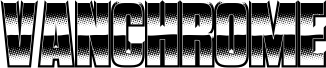
Vanchrome is a compact sans-serif headliner with chromatic layers. Create a layer in your design application, copy the layer, change the style, change the colors. Some applications such as Photoshop might need manual vertical alignment so cross-hair in the ◊ character position has been included. Due to the way Vanchromes bevel shading is designed, the Left and Right bevels should be placed under the Up and Down bevels. For a classic chrome effect, try the following order: Back, Front, Horizon, Ground, Sky, Left, Right, Up, Down, Grid (optional), Edge, Sparkle. Manually offset the back style to make a drop shadow. The Clear layer is designed to be used on its own or layered between Back and Sparkle layers. Greek and Cyrillic alphabets are included.

If you'd like separate color layers, you can get them at Typodermic Fonts.

The desktop license for Vanchrome Clear is free. If you'd like to embed this font in an app, ebook, on the web or anything that's not covered by the desktop license agreement, visit the link below. You'll find distributors who offer different types of licenses or you can contact me for help.

Please read the FAQ on the front page of Typodermic Fonts and don't be afraid to ask questions if you're not sure.

http://typodermicfonts.com/vanchrome
الوسوم

خريطة المحارف

استخدم القائمة المنسدلة لعرض خرائط المحارف المختلفة المتوفرة في هذا الخط.
الأساسية لاتينية - خريطة المحارف

معلومات الخط الأساسية

ملحوظة حقوق الملكية
Released in 2024 under CC0 license. No rights reserved.
الفئة الخطية
Vanchrome Clear
الفئة الفصيلية
Regular
تعريف الفئة الفصيلية
Version 1.001;TYPO;VanchromeClear-Regular;2024;FL830
اسم الخط بالكامل
VanchromeClear-Regular
نسخة قائمة الاسم
Version 1.001
اسم خط الحاشية النصية
VanchromeClear-Regular
اسم الصانع
Ray Larabie
المصمم
الوصف
Introducing Vanchromethe chromed up typeface with a compact sans-serif design and chromatic layer system, youll be able to create designs that truly stand out.

Lets start with the layer system. Vanchromes layer system is designed for maximum flexibility. All you have to do is create a layer in your design application, copy the layer, change the style, and change the colors. Its that easy! And if youre using Photoshop, weve even included a crosshair in the Ê character position to ensure perfect vertical alignment.

Now, lets talk about Vanchromes layering. The left and right bevels should be placed under the up and down bevels to achieve the classic chrome effect. For that classic look, try the following layer order: Back, Front, Horizon, Ground, Sky, Left, Right, Up, Down, Grid (optional), Edge, and Sparkle. And why not duplicate and manually offset the back style to create a drop shadow effect?

So why settle for ordinary when you can create designs that are truly unique with Vanchrome? Whether youre designing logos, posters, or anything in between, Vanchromes chromatic layers and airbrushed chrome effect will take your designs to the next level. Try it out today and see the difference for yourself!

معلومات الخط الموسعة

المنصات المدعومة

المنصةالترميز
الشفرة الدولية الموحدة - يونيكوددلالات الشفرة الدولية الموحدة 2.0 - BMP فقط
ماكينتوشغربي - روماني
مايكروسوفتنظام الحروف الدولي الموحد - BMP فقط

تفاصيل الخط

تاريخ الإنشاء2024-04-04
الإصدار1
عدد المحارف267
الوحدات لكل em1000
حقوق التضمينالتضمين لتثبيت دائم
فئة العائلةغير مصنف
الوزنمشدد / ثقيل
العرضمكثف
نمط Macغامق
الاتجاهفقط وبقوة من ألايسر الى يمين الرموز + يحتوي على المحايد
طبيعة النمطلعادية
تباعد المحارفغير موحدة
تتضمن الحزمة الكاملة الأوزان التالية وعددها 14:
Vanchrome Clear.otf
Vanchrome Grid.otf
Vanchrome Front.otf
vanchrome back.otf
Vanchrome Sparkle.otf
Vanchrome Left.otf
Vanchrome Up.otf
Vanchrome Right.otf
Vanchrome Edge.otf
Vanchrome Horizon.otf
Vanchrome Down.otf
Vanchrome Sky.otf
Vanchrome Ground.otf
Vanchrome Outline.otf